You do what you’re good at. Qanola does everything around it.
While you work, Qanola:
- posts to Instagram to bring in new customers
- turns followers and comments into bookings
- shares your booking link, so anyone can book
- brings your regulars back to your calendar
- asks for reviews and replies in your voice
- keeps you visible on Google and in AI answers
- posts to Instagram to bring in new customers
- turns followers and comments into bookings
- shares your booking link, so anyone can book
- brings your regulars back to your calendar
- asks for reviews and replies in your voice
- keeps you visible on Google and in AI answers
The problem
Three jobs stand between you and your craft.
Qanola takes the three off your plate, so the work you are good at goes back to being your whole job.
- 01Handled by Qanola
Find new customers
Instagram posts written from photos of your work
- 02Handled by Qanola
Keep the customers you have
Replies to your comments and DMs, in your voice and ready to send
- 03Handled by Qanola
Handle the rest of the routine
Bookings through your own link, straight into your Google Calendar
- 04Yours again
Do what you’re good at
The craft that made you start the business
Built for how your day actually runs.
One app for all the routine work of barbers, salons, nail studios, cleaners, garages and trainers.
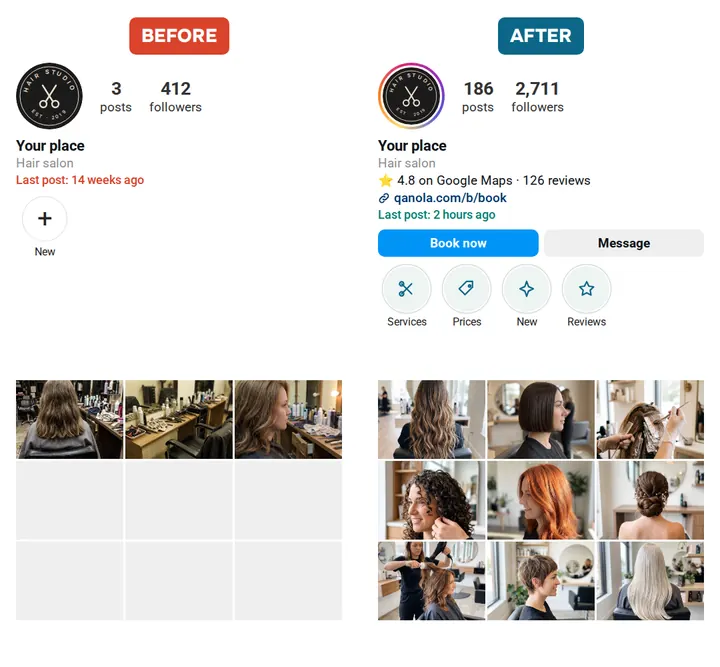
Win new customers on Instagram
Qanola writes each post from photos of your work, in your voice, and drafts the replies to your comments and DMs. You see each one the way Instagram will show it, and nothing goes out until you tap yes.
Bookings
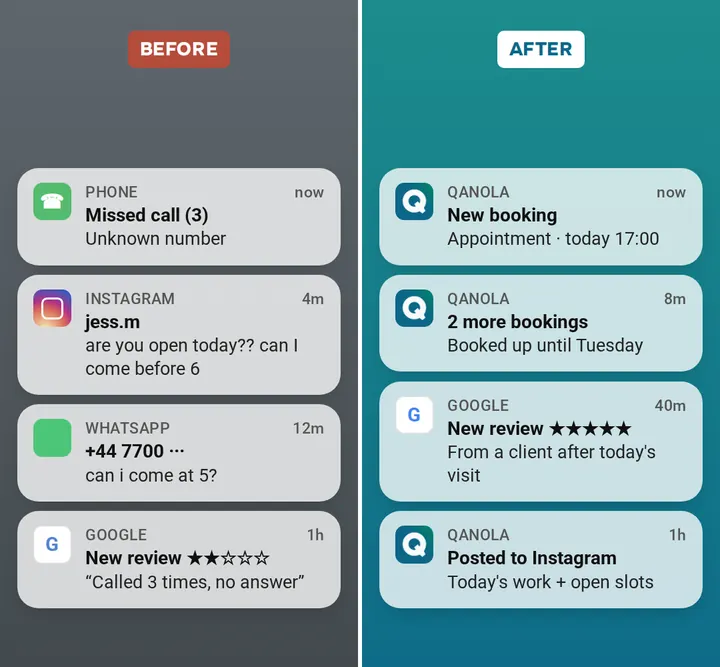
Stop answering the phone mid-job
Set your services, prices and working hours once. Clients pick a free time on your booking page instead of calling you mid-job, and every booking lands in your Google Calendar.
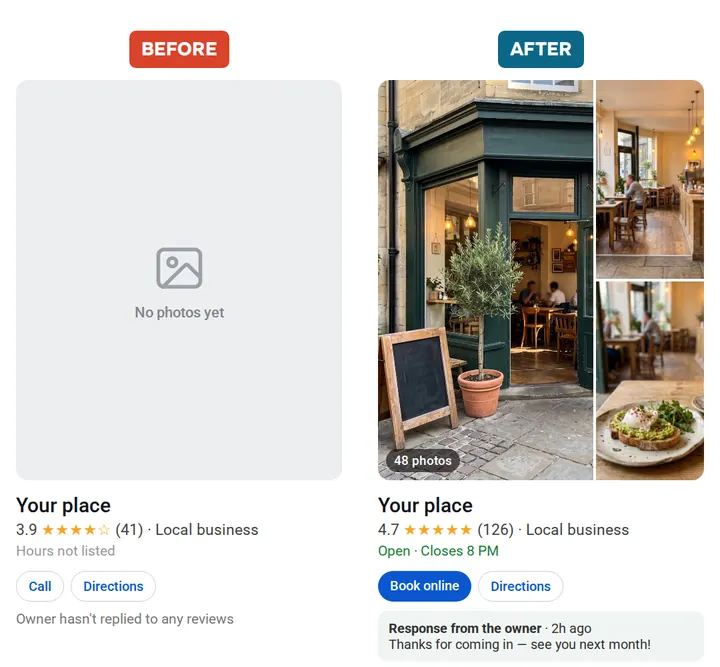
Turn Google searches into bookings
Qanola gives you a booking link for your Google listing and your Instagram bio, and walks you through adding it, so someone who finds you can book without picking up the phone.
And it’s all one app.
Everything around the job in one place.
Instagram posts
Written from your photos, sent on your yes
Comment replies
Drafted for your comments, sent on your tap
DM replies
A drafted answer, sent when you tap Send
Booking page
Your services, prices and free times behind one link
Google Calendar
Every booking in your calendar, busy times kept closed
A link for your Google listing
Qanola shows you where it goes and how to add it
Your first plan
What to post, fix and share first, from your answers
Ask anything
A question about your business, answered step by step in the chat
Google reviews Soon
Replies to reviews and requests after a visit
Payments and deposits Soon
Taking money from clients at booking
Client reminders Soon
A nudge before the appointment
TikTok and Facebook Soon
The same posts, more places
Why Qanola
Other apps give you a dashboard.Qanola hands you the finished draft.
Most tools for small businesses assume someone sits at a desk to use them. Qanola assumes your hands are busy. The post, the reply and the booking arrive done, on your phone, and wait for a tap.
Works with what you already use.
Instagram
A Business or Creator account. Posts, comments and DMs.
Google Calendar
Bookings written in, busy times read back.
Google Business Profile Soon
Today: a booking link you add yourself, with Qanola’s help.
Pricing
-
$20
per month, all of it included
- Instagram posts that bring in new customers
- Replies that turn followers and comments into customers
- Online bookings, straight into your calendar
- Reviews: asked for and answered in your voice
- Visibility in Google Search and in AI answers
Your questions, coveredGet started today
What exactly is Qanola?
An app for the person who does the job: it writes your Instagram posts from your photos, drafts the replies to your comments and DMs, and takes your bookings through your own link into your Google Calendar. Most tools give you a dashboard and leave the work to you. Qanola hands you the finished draft, and you tap yes.
Do I have to replace the tools I already use?
No. Qanola works with the Instagram account you have, writes bookings into the Google Calendar you already check, and gives you a booking link to put wherever customers find you: your bio, your Google listing, your website.
Will it do things without my permission?
No. Every post, every reply and every booking that needs confirming waits for your tap. There is no setting that lets it post or reply on its own.
What if it gets something wrong?
It never reaches a customer unchecked, because nothing goes out that you have not seen. Turn a post down and Qanola asks which part was wrong, so the next ones come back closer to how you would have put it. Your name is on the work, and it is treated that way.
Do I have to write anything?
No. Qanola writes the post, the reply and the message. Your part is reading what matters and tapping yes.
Where does it post and reply?
Instagram, for now: posts on your feed, and replies to your comments and DMs. Bookings come in through your own link. The rest is tagged Soon above.
What does Qanola cost?
$20 per month · cancel anytime. First month free. One plan, no commission on a booking, and no card to start.
How do I know any of it worked?
Open the app whenever you like to see what Qanola is working on and where each task has got to. Every booking sits in your Google Calendar, next to the rest of your day.